| Author |
Message |
dieselmartin
Profi-Schrauber

Joined: 03/13/2003
Posts: 10121
Karma: +29 / -0 
Location: in der Werkstatt
2007 Volkswagen Passat
Premium Support
|
 10-09-2007, 8:10 Subject: VAGCOM Update: 607.3 to 704.1 10-09-2007, 8:10 Subject: VAGCOM Update: 607.3 to 704.1 |
Quote |
|
.. I'm probably too stupid for it.
I had 607.3 RKS installed.
I thought, "Since I have some time right now, I'll do the exercises for level 7 in German (RKS) and English, even though I can't use them yet."
The result was that none of the three were working anymore.
Somehow, I managed to get those version 6 files working again using DPInst.exe.
The 7-zip DPInst.exe files are always getting stuck...
What did I do wrong?
m;
Transparency, Teamwork
... there was another T.
I don't know what the f*ck it was.
Translated on 26-10-2026, 2:26.
|
|
| Back to top |
Profile PM Garage |
 |
dieselschrauber
Administrator


Joined: 04/12/2002
Posts: 18128
Karma: +803 / -0
Location: St.Gallen
2018 Volkswagen T6 
|
| 10-09-2007, 12:02 Subject: VAGCOM Update: 607.3 to 704.1 |
Quote |
|
Hi Martin,
I hope that was the latest 704.1 version from the customer's account?
Where exactly is the problem occurring, and what is your computer configuration?
The DPInst.exe file is executed after the program installation is complete and initiates the driver installation. In most cases, simply running the self-extracting setup file is sufficient.
Best regards, Rainer.
Translated on 26-10-2026, 2:28.
|
|
| Back to top |
Profile PM WWW Garage |
|
dieselmartin
Profi-Schrauber
Joined: 03/13/2003
Posts: 10121
Karma: +29 / -0
Location: in der Werkstatt
2007 Volkswagen Passat
Premium Support
|
| 10-09-2007, 12:10 Subject: VAGCOM Update: 607.3 to 704.1 |
Quote |
|
Yes, the one from the customer login.
And it ran (without being connected to a cable).
The cable was connected, the car was plugged in, but nothing worked.
If I run DPInst later, it says that it has installed something and that's it... the window with the spinning leaves remains open forever.
It's an old DELL Latitude C600 running Windows 2000 SP4.
m;
Transparency, Teamwork
... there was another T.
I don't know what the f*ck it was.
Translated on 26-10-2026, 2:29.
|
|
| Back to top |
Profile PM Garage |
|
dieselschrauber
Administrator
Joined: 04/12/2002
Posts: 18128
Karma: +803 / -0
Location: St.Gallen
2018 Volkswagen T6
|
| 10-09-2007, 12:13 Subject: VAGCOM Update: 607.3 to 704.1 |
Quote |
|
Hi,
Quote: | | Do I click on DPInst retroactively | ?
Why are you doing that? However, it doesn't say anywhere that you should click on all the .exe files randomly  .
What exactly happens when you press the 'Test' button in the program settings of the 704.1? Of course, the diagnostic adapter must be plugged into the USB port.
Best regards, Rainer.
Translated on 26-10-2026, 2:30.
|
|
| Back to top |
Profile PM WWW Garage |
|
dieselmartin
Profi-Schrauber
Joined: 03/13/2003
Posts: 10121
Karma: +29 / -0
Location: in der Werkstatt
2007 Volkswagen Passat
Premium Support
|
| 10-09-2007, 12:21 Subject: VAGCOM Update: 607.3 to 704.1 |
Quote |
|
He immediately says that he can't find a diagnostic system.
After some clicking around, he wanted to reinstall the version 6 drivers (VAGUSB.sys), not the version 7 drivers (RT-USB.sys).
The following scenario led to a situation where "nothing more could be done."
(meanwhile, I've got the 6s working again).
(bare laptop)
- 704.1 en installed.
- 704.1 de installed.
I drove to my sister's place (wanted to get a car scan done).
- Cables for car and laptop.
- started from the 7 box.
- Test attempted.
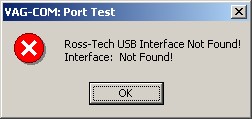
-> immediately received an error message indicating that his "cable" had been found.
| Description: |
| VAGCOM Update: 607.3 to 704.1 |
|
| File size: |
8.12 KB |
| Viewed: |
2142 times |
|
Transparency, Teamwork
... there was another T.
I don't know what the f*ck it was.
Translated on 26-10-2026, 2:31.
|
|
| Back to top |
Profile PM Garage |
|
dieselschrauber
Administrator
Joined: 04/12/2002
Posts: 18128
Karma: +803 / -0
Location: St.Gallen
2018 Volkswagen T6
|
| 10-09-2007, 12:45 Subject: VAGCOM Update: 607.3 to 704.1 |
Quote |
|
Please do the following:
- In Device Manager, uninstall the drivers for the interface (leave the interface plugged in).
- Plug in the interface.
- Reboot.
- Plug in the interface.
- Only run the German language installation for version 704.1.
- Click the "Test" button in the program settings again.
Please always use the same USB port.
Best regards, Rainer.
Translated on 26-10-2026, 2:33.
|
|
| Back to top |
Profile PM WWW Garage |
|
dieselmartin
Profi-Schrauber
Joined: 03/13/2003
Posts: 10121
Karma: +29 / -0
Location: in der Werkstatt
2007 Volkswagen Passat
Premium Support
|
| 10-09-2007, 12:56 Subject: VAGCOM Update: 607.3 to 704.1 |
Quote |
|
Will be done, Sir .
Quote: | | Please always use the same USB port. |
That piece of junk only has .
m; Transparency, Teamwork
... there was another T.
I don't know what the f*ck it was.
Translated on 26-10-2026, 2:34.
|
|
| Back to top |
Profile PM Garage |
|
dieselschrauber
Administrator
Joined: 04/12/2002
Posts: 18128
Karma: +803 / -0
Location: St.Gallen
2018 Volkswagen T6
|
| 10-09-2007, 13:11 Subject: VAGCOM Update: 607.3 to 704.1 |
Quote |
|
Hi Martin,
Here's something else I can think of: There were problems with selecting the correct device drivers in the initial release of 704.1, but those issues should have been resolved by now.
Your "problem" is somewhat known, but as I said, it shouldn't occur anymore, and I also don't have any similar reports with the current installation setup.
Therefore, I have the following suspicion: Could it be that you downloaded version 704.1 a while ago, and now every download attempt retrieves the "old" faulty setup version from the cache?
Perhaps you could temporarily rename the "607.3" directory on the hard drive to see if anything is still using it.
Best regards, Rainer.
Translated on 26-10-2026, 2:35.
|
|
| Back to top |
Profile PM WWW Garage |
|
dieselmartin
Profi-Schrauber
Joined: 03/13/2003
Posts: 10121
Karma: +29 / -0
Location: in der Werkstatt
2007 Volkswagen Passat
Premium Support
|
| 10-09-2007, 13:15 Subject: VAGCOM Update: 607.3 to 704.1 |
Quote |
|
It didn't look like it was coming "from the cache" (because it was too slow).
Okay, I'll follow your instructions exactly.
Greetings.
m;
Transparency, Teamwork
... there was another T.
I don't know what the f*ck it was.
Translated on 26-10-2026, 2:36.
|
|
| Back to top |
Profile PM Garage |
|
dieselmartin
Profi-Schrauber
Joined: 03/13/2003
Posts: 10121
Karma: +29 / -0
Location: in der Werkstatt
2007 Volkswagen Passat
Premium Support
|
| 10-09-2007, 13:30 Subject: VAGCOM Update: 607.3 to 704.1 |
Quote |
|
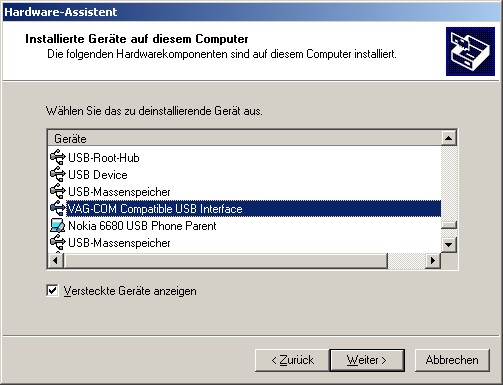
Quote: | | - In Device Manager, uninstall the 6.x drivers for the interface (leave the interface plugged in). |
is that him?
| Description: |
| VAGCOM Update: 607.3 to 704.1 |
|
| File size: |
42.18 KB |
| Viewed: |
2478 times |
|
Transparency, Teamwork
... there was another T.
I don't know what the f*ck it was.
Translated on 26-10-2026, 2:36.
|
|
| Back to top |
Profile PM Garage |
|
dieselschrauber
Administrator
Joined: 04/12/2002
Posts: 18128
Karma: +803 / -0
Location: St.Gallen
2018 Volkswagen T6
|
| 10-09-2007, 13:49 Subject: VAGCOM Update: 607.3 to 704.1 |
Quote |
|
Okay, I understand. Please provide the German text you would like me to translate into English.
Translated on 26-10-2026, 2:37.
|
|
| Back to top |
Profile PM WWW Garage |
|
dieselmartin
Profi-Schrauber
Joined: 03/13/2003
Posts: 10121
Karma: +29 / -0
Location: in der Werkstatt
2007 Volkswagen Passat
Premium Support
|
| 10-09-2007, 17:19 Subject: VAGCOM Update: 607.3 to 704.1 |
Quote |
|
Okay,
(Partial) success.
- 704.1 is running.
- Firmware update from version 1.65 to 1.78 installed on the HEX+CAN interface.
- Values can be read and STGs can be encoded.
BUT:
- Do PPDs not have any default settings (e.g., as defined in MWB 004)?
The button is at least grayed out.
- The labels for my BMR are nonsense again.
Sure, here's the translation:
"e.g., MWB 068 (should be loading coefficient, ash content, ash learning value)"
m;
Transparency, Teamwork
... there was another T.
I don't know what the f*ck it was.
Translated on 26-10-2026, 2:38.
|
|
| Back to top |
Profile PM Garage |
|
Ross-Tech-Support
Profi-Schrauber
Joined: 05/30/2005
Posts: 646
Karma: +8 / -0
Support
|
| 10-09-2007, 17:33 Subject: VAGCOM Update: 607.3 to 704.1 |
Quote |
|
VAG-COM > About shows "Full version / activated"?
dieselmartin wrote: | - Do PPDs not have any default settings (e.g., in MWB 004)?
The button is at least grayed out | .
Which button? The [default setting - 04] or the [switch to default setting] button on the measurement block screen?
Read the manual?
Specifically, I mean...
Quote: | Notes:
* Multiple groups are not permitted in Basic Settings. The [Switch To Basic Settings] button is intentionally disabled if you have groups "running" in the second and third rows. To stop a running group, click on the box that displays the group number (as though you wanted to enter a new number). The button is also disabled on controllers using KWP-2000. On those, you need to go directly to the Basic Settings screen. |
http://www.ross-tech.com/vag-com/tour/m-blocks.html
dieselmartin wrote: | | - The labels for my BMR are nonsense again. |
Then, manually re-enter the data, just like you did before.
Translated on 26-10-2026, 2:40.
|
|
| Back to top |
Profile PM |
|
dieselmartin
Profi-Schrauber
Joined: 03/13/2003
Posts: 10121
Karma: +29 / -0
Location: in der Werkstatt
2007 Volkswagen Passat
Premium Support
|
| 10-09-2007, 18:53 Subject: VAGCOM Update: 607.3 to 704.1 |
Quote |
|
Sebastian@OpenOBD wrote: | VAG-COM > About shows "Full version / activated"?
|
Um, no.
It simply says "(only) enabled."
I was at the MWB (presumably a specific location or event), and I only had one machine running, specifically machine number 004.
Sure, manually copying labels.
I had hoped that they would now be "standard"  .
m; Transparency, Teamwork
... there was another T.
I don't know what the f*ck it was.
Translated on 26-10-2026, 2:42.
|
|
| Back to top |
Profile PM Garage |
|
dieselschrauber
Administrator
Joined: 04/12/2002
Posts: 18128
Karma: +803 / -0
Location: St.Gallen
2018 Volkswagen T6
|
| 10-09-2007, 19:00 Subject: VAGCOM Update: 607.3 to 704.1 |
Quote |
|
Quote: | | I had hoped that they would be "standard" by now. |
If you implement it, already 
Translated on 26-10-2026, 2:43.
|
|
| Back to top |
Profile PM WWW Garage |
|


 Bookmarks
 Links
Links Garage
 FAQ, Legal Notice & Privacy
 RSS Feed
 Register
 Login
Login
