| Author |
Message |
dieselschrauber
Administrator


Joined: 04/12/2002
Posts: 18128
Karma: +803 / -0 
Location: St.Gallen
2018 Volkswagen T6 
|
 03-09-2009, 15:01 Subject: New VCDS release coming soon 03-09-2009, 15:01 Subject: New VCDS release coming soon |
Quote |
|
Quote: | VAG-COM Diagnostic System (VCDS)
Changes/Updates in version 908.0.
New feature: Support for measurement values (live data), logging, and graphical representation related to UDS/ODX/ASAM ECUs. This function requires a control unit-specific "overview" of the available measurement values. For this reason, it is even more important in the future to ensure that you are always working with the latest version of VCDS and the most up-to-date data.
text
New feature: Support for CAN TP 1.6. This will be used, for example, in the Bosch 8.2 ABS/ESP system in the new Seat Ibiza (6J). However, if available, it will also be used for other models/ECUs, as it allows for faster query times (e.g., in the auto-scan).
"New Feature: Updated control unit selection for CAN-based models. Instead of the previous selection/tab labeled "General," a selection of the control units installed in the vehicle will now be displayed, based on the gateway parts list." This function can be disabled through the program settings.
New feature: Simultaneous readings or logging for vehicles with two engine control units (ECUs). This applies not only to the 10- and 12-cylinder engines, but also to the 8-cylinder engine known from the Audi RS4 (8E).
New feature: Enable/disable transport mode for numerous new models. As part of the updates, the following models have been added to the list of supported vehicles: Audi R8 (42) model year 2009, Seat Ibiza (6J), VW Touareg (7L) facelift, VW Phaeton (3D) facelift, and Audi A6 (4F) facelift.
New feature: Reading the mileage from engine control units now supports numerous EDC16 versions.
Update: The assistant for programming airbag control units now supports many more new models.
New feature: Support for non-standard error code types. In connection with SAE/ISO "B" and "C" codes, VW uses non-standard subtypes of error codes in some cases, which are now correctly supported and displayed.
"New feature: Actuator diagnostics for control units with UDS/ODX/ASAM protocol. These control units only support selective actuator diagnostics; they no longer support the older sequential actuator diagnostics." This function requires a control unit-specific "overview" of the available measurement values. For this reason, it is even more important in the future to ensure that you are always working with the latest version of VCDS and the most up-to-date data.
New feature: Automatically updating list of supported gateway configurations. The "Auto-Scan" function now optionally includes the ability to periodically retrieve the gateway installation list, which can be helpful in some cases to identify when errors occur.
"New Feature: Adaptation for ECUs with UDS/ODX/ASAM protocol. Because the adaptation function works differently in ECUs with UDS compared to older ECUs, the display has been modified accordingly. The previously known channel numbers no longer exist; instead, you select the specific adaptation channel directly from a list. Not every ECU supports all of the listed adaptation channels." If a channel is not available, you will see the message "Adaptation channel not available."
"New feature: Measurement data acquisition for UDS ECUs is now faster. The "Group UDS requests" function allows for a significant increase in the sampling rate when multiple measurement values are selected. Each ECU has a limit on the number of requests that can be combined. Unfortunately, there is currently no way to determine this limit in advance." If you combine too many queries, the control unit will simply reject them.
Here's the translation:
"New Feature: Direct Selection for Customization Channels and Basic Settings. To simplify navigation to individual customization channels and basic settings, and to avoid having to constantly look up their metrics, we have now added the option to directly select the desired functions from a list." This function is only available if the corresponding control unit documentation also includes the necessary entries.
Improvement: Battery coding assistant revised.
Improvement: Support for new ECU (Engine Control Unit) addresses.
Improvement: Numerous improvements have been made to the auto-scan function. Displaying additional information alongside the latest control units and automatically skipping so-called "phantom control units" that appear in newer models.
Improvement: Completely revised ODX/ASAM data. Additional support for the adaptation function and coverage of new electronic control units (ECUs).
Improvement: Service requests can now be accessed directly through the main menu. The "ECU Search" function has been removed from the main menu and replaced with the "Service Reset" function. The "ECU Search" function is now located in the "Applications" menu, where the "Service Reset" function used to be.
"Improvement: The menu for service settings has been revised. In the future, no default selection will be made, and the user must actively and independently make a selection. This is necessary for many models from the 2008 model year onwards, as otherwise the wrong selection is often made unintentionally, leading to incorrect programming." The old values can now also be saved in the diagnostic log.
Revised OBD2/EOBD functionality. A higher sampling rate is now possible through the use of the "turbo mode," which is already known from VAG-specific functions, as well as by explicitly hiding the second control unit (in vehicles with automatic transmissions). Furthermore, the compatibility with newer BMW models equipped with automatic transmissions has been improved, and in mode 1, it is now possible to copy or save the data, just as it was already possible.
Improvement: HEX Interface Firmware version 1.81. This allows VCDS greater flexibility in selecting the K-line used for communication. This should increase compatibility with vehicles that use pin 15 of the diagnostic socket for non-standard purposes. As with previous versions 1.79/1.80, HEX interfaces no longer start in compatibility mode for use with third-party software. If you still require this support, you can enable or disable it through the Settings menu.
Improvement: New USB drivers. Includes numerous fixes for compatibility and stability.
Improvement: Error code list revised, now containing over 13,000 error codes.
Improvement: Engine control unit documentation (e.g.,). Label files) are expanded/updated.
Improvement: Installation revised and prepared for Windows 7.
Known issues.
The previously used USB drivers had an incorrect version number that was significantly higher than it should have been. After installing the new drivers, Windows may report that these drivers are older than the ones previously used. If you are asked whether you want to use them anyway, answer "Yes." Older versions of VCDS (e.g., "Release 805) will also complain about supposedly outdated drivers; this message can and should be ignored."
System Requirements.
The following devices are supported: laptops, tablet PCs, subnotebooks, ultra-mobile PCs (UMPCs), and traditional desktop PCs that meet the following minimum requirements. Deviations from the requirements exist due to the interface hardware being used.
Intel Pentium 100 MHz (or equivalent) with 32 MB of RAM for serial interface hardware (KEY-COM, HEX-COM, HEX-COM+CAN), or. Intel Pentium III 500 MHz (or equivalent) with 64 MB of RAM for USB interface hardware (KEY-USB, KII-USB, HEX-USB, HEX-USB+CAN).
Microsoft Windows 98 or later is required. Windows 98, ME, 2000, XP-32, XP-64, and Vista-32 and Vista-64 are supported.
80 MB of available disk space.
Screen resolution: 640x480 pixels (1024x768 recommended).
If you are using an external power supply, make sure it is suitable for use with other externally powered devices, otherwise damage to your interface hardware may occur.
Safety instructions.
Before making any changes to vehicle systems (e.g., coding, adjustments, etc.), the original values should be saved or... This information can be recorded, for example, using a diagnostic log (auto-scan) and/or a Screenshot of the control unit.
Before test drives, secure the diagnostic device/laptop in the vehicle (e.g., using a seatbelt). When driving alone and with data logging enabled, the passenger seat or the area in front of the passenger seat is suitable. Ensure that the device is located outside of any potential airbag deployment zones. When traveling with a second person, it is preferable for that person to operate the diagnostic device from the back seat, as the front seats would be too dangerous in the event of an airbag deployment.
Working on airbag and restraint systems.
Testing, assembly, and maintenance work must only be performed by trained personnel.
Please refer to the vehicle manufacturer's guidelines and instructions (e.g., see the repair manual).
Before clearing error codes from airbag control units, check the corresponding components and pay particular attention to the current readings. When clearing the codes, ensure that no person is inside the vehicle or within the deployment range of an airbag (e.g.,). Pedestrian protection, battery isolation, or restraint systems can be affected.
|
Whoever finds any spelling mistakes, may keep them.
I'm getting a message that version 805.4 is outdated. What should I do? Stay calm and don't panic. First, it helps to click the message away.
When will the VCDS update be released? Soon.
Best regards, Rainer.
Translated on 03-07-2026, 14:19.
|
|
| Back to top |
Profile PM WWW Garage |
 |
dieselschrauber
Administrator
Joined: 04/12/2002
Posts: 18128
Karma: +803 / -0
Location: St.Gallen
2018 Volkswagen T6
|
| 06-09-2009, 20:26 Subject: New VCDS release coming soon |
Quote |
|
The current RKS 908.0 installation package unfortunately still contains a lot of bugs, and an update for the update will be available soon.
Translated on 03-07-2026, 14:19.
|
|
| Back to top |
Profile PM WWW Garage |
|
Roger
Profi-Schrauber


Joined: 10/11/2002
Posts: 3035
Karma: +88 / -0
Location: Rodgau
2017 Volkswagen Golf
Premium Support
|
| 06-09-2009, 22:55 Subject: New VCDS release coming soon |
Quote |
|
Hi Rainer, that's a shame!
Does this also apply to the English package, which is still available for download?
Gruß
Roger
MJ 2018 GTI Performance DLBA

Translated on 03-07-2026, 14:19.
|
|
| Back to top |
Profile PM Garage |
|
ulf
Profi-Schrauber
Joined: 04/13/2002
Posts: 11058
Karma: +18 / -0
Location: Saarland
2023 MG ZS
Premium Support
|
| 07-09-2009, 6:56 Subject: New VCDS release coming soon |
Quote |
|
Rainer K. wrote: | | The current RKS 908.0 installation package unfortunately still contains a lot of bugs, and an update for the update will be available soon... | Ah, it's good that I haven't installed the download yet. I actually prefer the "obsolete" bubble when starting the 80508(?) 
@Rainer: Will there be an official announcement regarding the update? Gruß Ulf
_________
MG4 Electric
Translated on 03-07-2026, 14:19.
|
|
| Back to top |
Profile PM Garage |
|
dieselschrauber
Administrator
Joined: 04/12/2002
Posts: 18128
Karma: +803 / -0
Location: St.Gallen
2018 Volkswagen T6
|
| 07-09-2009, 7:49 Subject: New VCDS release coming soon |
Quote |
|
Hi Roger, Ulf,
The English package contains the original English executable file, so I assume everything is okay here.
Quote: | | @Rainer: Will there be an official announcement regarding the update update? |
 Yes.
Best regards, Rainer.
Translated on 03-07-2026, 14:19.
|
|
| Back to top |
Profile PM WWW Garage |
|
Roger
Profi-Schrauber
Joined: 10/11/2002
Posts: 3035
Karma: +88 / -0
Location: Rodgau
2017 Volkswagen Golf
Premium Support
|
| 07-09-2009, 9:16 Subject: New VCDS release coming soon |
Quote |
|
Thank you for the feedback  .
I think I'll wait for the next version before installing. Gruß
Roger
MJ 2018 GTI Performance DLBA
Translated on 03-07-2026, 14:19.
|
|
| Back to top |
Profile PM Garage |
|
dieselschrauber
Administrator
Joined: 04/12/2002
Posts: 18128
Karma: +803 / -0
Location: St.Gallen
2018 Volkswagen T6
|
| 09-09-2009, 18:09 Subject: New VCDS release coming soon |
Quote |
|
Okay, the update for the update is now live.
| Description: |
| VCDS Diagnosekabel und Fahrzeuge |
|

Download |
| File name: |
VCDS_Fahrzeugliste.pdf |
| File size: |
351.08 KB |
| Downloaded: |
1242 times |
Translated on 03-07-2026, 14:19.
|
|
| Back to top |
Profile PM WWW Garage |
|
chriskross
Blaumann

Joined: 04/19/2006
Posts: 304
Karma: +3 / -0
Location: Österreich
Premium Support
|
| 10-09-2009, 8:45 Subject: New VCDS release coming soon |
Quote |
|
Rainer K. wrote: | | So, the update for the update is now online. |
So, that means the final version of RKS 908.0 is coming soon.
Best regards, Chris. A6 AFB
A6 BRE DPF
Translated on 03-07-2026, 14:19.
|
|
| Back to top |
Profile PM |
|
Roger
Profi-Schrauber
Joined: 10/11/2002
Posts: 3035
Karma: +88 / -0
Location: Rodgau
2017 Volkswagen Golf
Premium Support
|
| 10-09-2009, 8:56 Subject: New VCDS release coming soon |
Quote |
|
Rainer K. wrote: | | So, the update for the update is now online. |
THX is now installed. The USB drivers were still reported as being older, but after confirmation, everything ran smoothly. I haven't been able to try it on the car yet.
I find it a bit annoying that the interface always wants to perform the complete driver installation for each individual USB port on the laptop. If you don't want to have to go through this process in the car, you have to connect the interface to all USB ports one by one after each VCDS update and confirm the installation. Or, you can consistently use the exact same USB port.
I suppose that's more likely due to the interface hardware, isn't it? Gruß
Roger
MJ 2018 GTI Performance DLBA
Translated on 03-07-2026, 14:19.
|
|
| Back to top |
Profile PM Garage |
|
dieselschrauber
Administrator
Joined: 04/12/2002
Posts: 18128
Karma: +803 / -0
Location: St.Gallen
2018 Volkswagen T6
|
| 10-09-2009, 9:06 Subject: New VCDS release coming soon |
Quote |
|
Hi Roger,
Roger wrote: | | THX, it's now installed. The USB drivers were still reported as older, but after confirmation, everything went through. I haven't been able to try it on the car yet. |
That's because the 'old' ones were registered as being too new, but the current ones are correct.
Roger wrote: | I find it a bit annoying that the interface always wants to perform the complete driver installation on each individual USB port of the laptop. If you don't want to have to go through this process in the car, you have to connect the interface to all USB ports one after another and confirm the installation after each VCDS update. Or, you can consistently use the exact same USB port.
I guess that's more likely due to the interface hardware, or ? |
It's partially due to the driver and partially due to the USB hardware of the computer.
Best regards, Rainer.
Translated on 03-07-2026, 14:19.
|
|
| Back to top |
Profile PM WWW Garage |
|
Goisbart
Joined: 07/15/2009
Posts: 15
Karma: +3 / -0
Premium Support
|
| 10-09-2009, 18:42 Subject: New VCDS release coming soon |
Quote |
|
Hello,
After the "Auto Scan" feature didn't work on the first device (908), it is now working correctly after the update. Unfortunately, the "turbo" function is no longer working. Is this intentional?
Greetings.
Translated on 03-07-2026, 14:19.
|
|
| Back to top |
Profile PM |
|
dieselschrauber
Administrator
Joined: 04/12/2002
Posts: 18128
Karma: +803 / -0
Location: St.Gallen
2018 Volkswagen T6
|
| 10-09-2009, 19:11 Subject: New VCDS release coming soon |
Quote |
|
Hi,
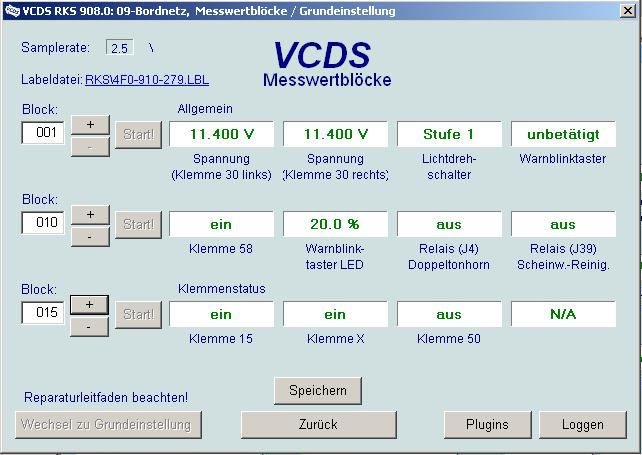
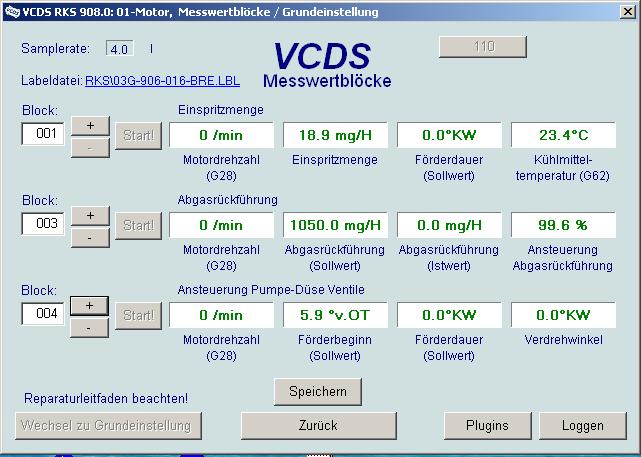
Whether the 'Turbo' function is available for the measurement blocks depends on the specific engine control unit.
EDC16 etc. Turbo, on-board computer not turbo, see pictures.
Which engine control unit (ECU) do you think would provide turbo values?
Best regards, Rainer.
| Description: |
| Kein Turbo z.B. beim Bordnetzsteuergerät. |
|
| File size: |
52.73 KB |
| Viewed: |
5643 times |
|
| Description: |
| VCDS Messwertblöcke mit Turbo beim BRE (EDC16) |
|
| File size: |
58.52 KB |
| Viewed: |
8309 times |
|
Translated on 03-07-2026, 14:19.
|
|
| Back to top |
Profile PM WWW Garage |
|
Goisbart
Joined: 07/15/2009
Posts: 15
Karma: +3 / -0
Premium Support
|
| 10-09-2009, 19:53 Subject: New VCDS release coming soon |
Quote |
|
Rainer K. wrote: | | Which ECU, in your opinion, should provide turbo values? |
Hi,
This is the engine control unit (ECU) for an Audi A3 with a BMM engine. The turbocharger has already been used with this ECU, and here are the current data:
Address 01: Engine Label file: RKS\03G-906-021-BMM.lbl
Part number SW: 03G 906 021 JH, HW: 03G 906 021 AB.
Part: R4 2.0L EDC G000SG 1320
Revision: --H07---
Just occurred to me: I recently (before the update) activated the cruise control. Could there be a connection? Probably not, right? Errors are not being saved.
Greetings.
Translated on 03-07-2026, 14:19.
|
|
| Back to top |
Profile PM |
|
ulf
Profi-Schrauber
Joined: 04/13/2002
Posts: 11058
Karma: +18 / -0
Location: Saarland
2023 MG ZS
Premium Support
|
| 11-09-2009, 5:52 Subject: New VCDS release coming soon |
Quote |
|
Rainer K. wrote: | Roger wrote: | I find it a bit annoying that the interface always wants to perform the complete driver installation on each individual USB port of the laptop. If you don't want to have to go through this process in the car, you have to connect the interface to all USB ports one after another and confirm the installation after each VCDS update. Or, you can consistently use the exact same USB port.
I guess that's more likely due to the interface hardware, or ? |
It's | partly due to the driver and partly to the USB hardware of the computer. I can probably confirm the latter: My Lenovo has 4 USB ports, and after the interface recognition process on one of the ports, I tried plugging it into a different port as a test -> it didn't start a new recognition process, but continued immediately. Gruß Ulf
_________
MG4 Electric
Translated on 03-07-2026, 14:19.
|
|
| Back to top |
Profile PM Garage |
|
Steffen W
Profi-Schrauber
Joined: 07/05/2008
Posts: 1276
Karma: +104 / -0
Location: Altenburg
Premium Support
|
| 11-09-2009, 6:39 Subject: New VCDS release coming soon |
Quote |
|
"I also experience the same issue, where I can use all three USB ports without needing to reinstall the driver. This was also the case with the 805.4 driver. My laptop is an Amilo."
Passat Variant BGW 2005
2024 Dacia Duster blue dci 115
Translated on 03-07-2026, 14:19.
|
|
| Back to top |
Profile PM |
|
dieselschrauber
Administrator
Joined: 04/12/2002
Posts: 18128
Karma: +803 / -0
Location: St.Gallen
2018 Volkswagen T6
|
| 11-09-2009, 7:43 Subject: New VCDS release coming soon |
Quote |
|
Goisbart wrote: | Rainer K. wrote: | | Which engine control unit (ECU) do you think would deliver turbo-like performance? |
Hi,
This is the engine control unit (ECU) for an Audi A3 with a BMM engine. The turbocharger has already been used with this ECU, and here are the current data:
Address 01: Engine Label file: RKS\03G-906-021-BMM.lbl
Part number SW: 03G 906 021 JH, HW: 03G 906 021 AB.
Part: R4 2.0L EDC G000SG 1320
Revision: --H07---
Just occurred to me: I recently (before the update) activated the cruise control. Could there be a connection? Probably not, right? Errors are not being saved.
Greetings |
Hmm, does the "Turbo" button not appear at all in the measurement blocks, or is it just not clickable? What happens if you use the English 908.0 version? It can be installed in parallel without any problems.
Best regards, Rainer.
Translated on 03-07-2026, 14:19.
|
|
| Back to top |
Profile PM WWW Garage |
|
|


 Bookmarks
 Links
Links Garage
 FAQ, Legal Notice & Privacy
 RSS Feed
 Register
 Login
Login

