| Author |
Message |
dieselschrauber
Administrator


Joined: 04/12/2002
Posts: 18107
Karma: +799 / -0 
Location: St.Gallen
2018 Volkswagen T6 
|
 06-10-2007, 20:06 Subject: CSV Log Viewer: KDataScope Download & Features 06-10-2007, 20:06 Subject: CSV Log Viewer: KDataScope Download & Features |
Quote |
|
Subject for improvement suggestions and release history for the CSV Log Viewer KDataScope.
What is KDataScope good for?
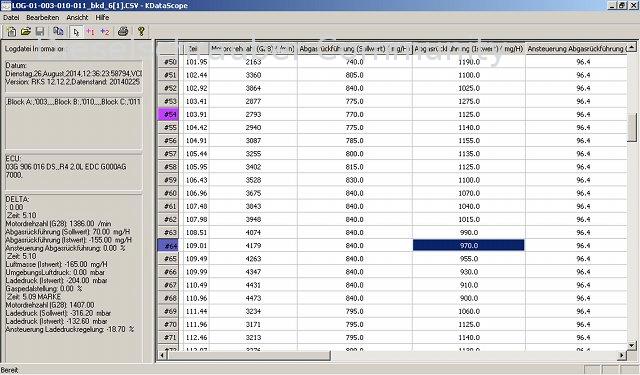
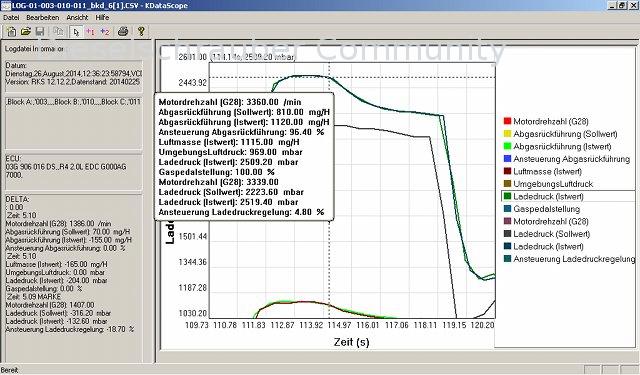
KDataScope is a program for viewing recorded VCDS, KOBD2Check, or GS-911 log files, allowing you to quickly and easily overview and analyze the recorded data.
The KDataScope program is an easy-to-use alternative to VAGScope, which has the following advantages:
- Quickly locate interesting data points using the variable zoom function.
- Automatic scaling of measurement curves.
- Measurement values as a tooltip for the cursor position in the log.
- Delta cursor.
- Create 3D views (maps) from measurement curves.
Without conversion clutter, without pointless clicking. Nothing needs to be converted or awkwardly configured, nothing needs to be awkwardly imported into spreadsheets: Double-click the log file, and view it!
Whether as measurement curves with and without zoom, as tabular numerical values, or for chip tuners to generate/identify 3D characteristic maps.
Do you want to test KDataScope for free? Download the KDataScope demo version!
Sure, here is the translation of the text from German to English:
"Suggestions for improvement are welcome."
The current KDataScope version from Kaufmann Automotive is included in the diesel tuning VCDS distribution and in the RKS+CAN (KOBD2Check OBD2 tool, KCANMonitor CAN sniffer), but can also be purchased separately.
Best regards, Rainer.
PS: How to create a VCDS log
| Description: |
| CSV Dateien von VCDS oder KOBD2Check ansehen, Tabellenansicht. |
|
| File size: |
62.61 KB |
| Viewed: |
4431 times |
|
| Description: |
| CSV Dateien von VCDS oder KOBD2Check ansehen, Messwertkurven. |
|
| File size: |
65.16 KB |
| Viewed: |
4246 times |
|
Translated on 22-09-2026, 2:37.
|
|
| Back to top |
Profile PM WWW Garage |
 |
Jochen_145
Guest
Free account, no CAN development support
|
| 07-10-2007, 12:08 Subject: CSV Log Viewer: KDataScope Download & Features |
Quote |
|
Hello Rainer,
Not bad for a first attempt.
What I personally miss, or what would simplify the analysis of measurement data:
- Zoom, scaling of the x and y axes.
- The ability to work with two y-axes to, for example, display motor speed and pumping duration in the same graph.
- The ability to show or hide signals from the log file in the graph, allowing you to display, for example, only 3 out of 12 recorded signals.
It's great that the crosshair accurately displays the measured values of the selected signal.
Best regards, Jochen.
Translated on 22-09-2026, 2:40.
|
|
| Back to top |
|
|
dieselschrauber
Administrator
Joined: 04/12/2002
Posts: 18107
Karma: +799 / -0
Location: St.Gallen
2018 Volkswagen T6
|
| 07-10-2007, 12:11 Subject: CSV Log Viewer: KDataScope Download & Features |
Quote |
|
Hi Jochen,
Thank you for the tips! Zoom is already available; you can create a rectangle with the left mouse button, and the view will zoom into that area (click in the upper left corner and drag to the lower right while holding down the left mouse button).
In the opposite direction (from the bottom right to the top left in the diagram), it zooms back out.
You can change the x/y axis scaling by clicking on the endpoint value.
Best regards, Rainer.
Translated on 22-09-2026, 2:42.
|
|
| Back to top |
Profile PM WWW Garage |
|
Jochen_145
Guest
Free account, no CAN development support
|
| 07-10-2007, 12:29 Subject: CSV Log Viewer: KDataScope Download & Features |
Quote |
|
Zomm is already available.
Ha, once you know, it's great to play like that, awesome!
You can change the x/y axis scales by clicking on the end value.
I personally think it would be a bit better if the new values could be accepted using either the <TAB> or <enter> key.
It's a bit unusual that I have to click somewhere with the mouse first.
Well, I'm just kind of used to MS-Windows... 
But still, the program will be nice  .
Best regards, Jochen.
Translated on 22-09-2026, 2:43.
|
|
| Back to top |
|
|
ulf
Profi-Schrauber

Joined: 04/13/2002
Posts: 11058
Karma: +18 / -0
Location: Saarland
2023 MG ZS
Premium Support
|
| 07-10-2007, 18:15 Subject: CSV Log Viewer: KDataScope Download & Features |
Quote |
|
Hi Rainer,
"My program often crashes on my laptop running Windows 98SE (a white window appears, and reopening the file only works occasionally)."
I'm attaching one of my .csv files, which seems to be causing some issues.
| Description: |
| CSV Log Viewer: KDataScope Download & Features |
|

Download |
| File name: |
LOG-01-008-010-033.CSV |
| File size: |
34.37 KB |
| Downloaded: |
2959 times |
Gruß Ulf
_________
MG4 Electric
Translated on 22-09-2026, 2:44.
|
|
| Back to top |
Profile PM Garage |
|
ulf
Profi-Schrauber
Joined: 04/13/2002
Posts: 11058
Karma: +18 / -0
Location: Saarland
2023 MG ZS
Premium Support
|
| 07-10-2007, 20:47 Subject: CSV Log Viewer: KDataScope Download & Features |
Quote |
|
vagtuning wrote: | | My log also hangs on "Program is ending" |
Then Rainer has something to look for, because... by the way, the log was created using his Hex-CAN system: "Incompatibility" will not be accepted as a reason  . Gruß Ulf
_________
MG4 Electric
Translated on 22-09-2026, 2:45.
|
|
| Back to top |
Profile PM Garage |
|
Malte1408
Schrauber

Joined: 06/23/2005
Posts: 427
Karma: +12 / -0
Location: Hannover
Premium Support
|
| 07-10-2007, 21:01 Subject: CSV Log Viewer: KDataScope Download & Features |
Quote |
|
ulf wrote: | vagtuning wrote: | | My log also gets stuck on "Program is ending" |
Then Rainer has something to look for, because... by the way, the log was created using his Hex-CAN system: "Incompatibility" will not be accepted as a reason | .
It seems like it has already been converted using a CSV converter, so it's not a proper CSV file anymore.
Translated on 22-09-2026, 2:45.
|
|
| Back to top |
Profile PM |
|
ulf
Profi-Schrauber
Joined: 04/13/2002
Posts: 11058
Karma: +18 / -0
Location: Saarland
2023 MG ZS
Premium Support
|
| 07-10-2007, 21:14 Subject: CSV Log Viewer: KDataScope Download & Features |
Quote |
|
Malte1408 wrote: | | It appears that this file has already been converted using the CSV converter, so it's not a true CSV file anymore. |
Normally, no... (The file is) opened (with Excel), saved as .xls, and then the .csv file immediately goes to the "Lappi" recycle bin.
From there, I retrieved them again, but without making any changes. I always only process .xls files further. Gruß Ulf
_________
MG4 Electric
Translated on 22-09-2026, 2:46.
|
|
| Back to top |
Profile PM Garage |
|
dieselschrauber
Administrator
Joined: 04/12/2002
Posts: 18107
Karma: +799 / -0
Location: St.Gallen
2018 Volkswagen T6
|
| 08-10-2007, 9:12 Subject: CSV Log Viewer: KDataScope Download & Features |
Quote |
|
Hi Ulf,
The file contains hyphens and commas instead of commas and periods.
The program should still not crash, of course  .
Best regards, Rainer.
Translated on 22-09-2026, 2:47.
|
|
| Back to top |
Profile PM WWW Garage |
|
dieselschrauber
Administrator
Joined: 04/12/2002
Posts: 18107
Karma: +799 / -0
Location: St.Gallen
2018 Volkswagen T6
|
| 08-10-2007, 23:41 Subject: VAG-COM: KDataScope Diagnostic Tool |
Quote |
|
Update to fix freezing issues, Print/Save As Bitmap...
Translated on 22-09-2026, 2:48.
|
|
| Back to top |
Profile PM WWW Garage |
|
wolfi_b
Profi-Schrauber
Joined: 02/17/2004
Posts: 860
Karma: +1 / -0
Support
|
| 09-10-2007, 8:11 Subject: CSV Log Viewer: KDataScope Download & Features |
Quote |
|
Hi Rainer!
Nice toy .
I personally would like to have a "Save as GIF" option.
"Furthermore, it seems your tool doesn't like Group 0 logs."
Unfortunately, some people are dependent on group 0. 
| Description: |
| CSV Log Viewer: KDataScope Download & Features |
|
Download |
| File name: |
LOG-01-000-xxx-xxx.CSV |
| File size: |
18.87 KB |
| Downloaded: |
1673 times |
1993 Audi 80 B4 1Z
2004 Seat Leon 1M ASV
Translated on 22-09-2026, 2:48.
|
|
| Back to top |
Profile PM |
|
dieselschrauber
Administrator
Joined: 04/12/2002
Posts: 18107
Karma: +799 / -0
Location: St.Gallen
2018 Volkswagen T6
|
| 11-10-2007, 22:18 Subject: CSV Log Viewer: KDataScope Download & Features |
Quote |
|
Update: Measurement block 0, shortcuts.
Translated on 22-09-2026, 2:49.
|
|
| Back to top |
Profile PM WWW Garage |
|
oldewurtel
Guest
Free account, no CAN development support
|
| 08-01-2008, 21:42 Subject: CSV Log Viewer: KDataScope Download & Features |
Quote |
|
Hello Rainer,
That's certainly a very useful tool, considering how many mouse clicks it takes to see a few curves after a log flight...
Here are the bugs I identified during a quick test (using XP Professional on a DELL D610 laptop, 1.6 GHz):
Sometimes, the cursor gets stuck and doesn't move properly on my mouse.
2. How do you exit the zoom mode? Reloading the file works...
Additional desirable features:
Here's the translation:
1. Option to convert the TV size to (100-TV) to make the TV size more logical (e.g., a small TV results in a smaller LD, a large TV results in a larger LD). I often make mistakes here...
2. General file information would certainly be helpful (date, time, filename).
Translated on 22-09-2026, 2:50.
|
|
| Back to top |
|
|
dieselschrauber
Administrator
Joined: 04/12/2002
Posts: 18107
Karma: +799 / -0
Location: St.Gallen
2018 Volkswagen T6
|
| 09-01-2008, 0:21 Subject: CSV Log Viewer: KDataScope Download & Features |
Quote |
|
Hi Kassen,
Quote: | Zoom is already available; you can use the left mouse button to draw a rectangle, and the area within that rectangle will be zoomed in (click on the top-left corner and drag to the bottom-right corner).
In the opposite direction (pulling from the bottom right to the top left in the diagram), it zooms back out. |
Thank you for the tips!
What do you mean by 1)? The 'crosshair' (cursor) should always move to the point closest to the mouse pointer.
Best regards, Rainer.
Translated on 22-09-2026, 2:51.
|
|
| Back to top |
Profile PM WWW Garage |
|
oldewurtel
Guest
Free account, no CAN development support
|
| 13-01-2008, 12:04 Subject: CSV Log Viewer: KDataScope Download & Features |
Quote |
|
Hello Rainer,
My problem with the undefined crosshair has been resolved to my satisfaction.
(The actual problem was in front of the PC ).
Unfortunately, for testing the tool, I had used a log file that contained very long gaps.
There are three sections of data that were separated by pauses.
In the representation, the last data point from section 1 is naturally connected to the first data point from section 2 by a straight line.
Since this line itself does not contain any data points, the crosshair 'jumps' over this line  when transitioning from section 1 to section 2.
The zoom function works, you just have to know how to use it. It would probably be better placed in the context menu (right-click menu) .
But I have another idea for improvement:
For example, if you have logged 3 MWB (measurement data blocks), the screen can become quite crowded.
It should be possible to turn individual 'data traces' on or off in the legend using the mouse.
Here's how you could extract the important data.
Edit: I only saw it later, but Jochen_145 also had that idea.
Best regards, Kassen.
Translated on 22-09-2026, 2:54.
|
|
| Back to top |
|
|
dieselschrauber
Administrator
Joined: 04/12/2002
Posts: 18107
Karma: +799 / -0
Location: St.Gallen
2018 Volkswagen T6
|
| 05-03-2008, 21:15 Subject: CSV Log Viewer: KDataScope Download & Features |
Quote |
|
VAG-COM / VCDS: New log file type association and application framework.
Translated on 22-09-2026, 2:55.
|
|
| Back to top |
Profile PM WWW Garage |
|
|


 Bookmarks
 Links
Links Garage
 FAQ, Legal Notice & Privacy
 RSS Feed
 Register
 Login
Login
