| Author |
Message |
herwigw
Guest
Free account, no CAN development support
|
 28-09-2006, 13:54 Subject: Remote Key Programming: Radio OK, WFS Blocked on Startup 28-09-2006, 13:54 Subject: Remote Key Programming: Radio OK, WFS Blocked on Startup |
Quote |
|
Hello fellow DIY enthusiasts,
Since I now only have two keys for the vehicle (two remote keys and one 'workshop' key), instead of the original three...
I can only find the thin workshop key, so I bought new remote keys for my Bora 2.
I saved myself the 30 euros that the friendly person wanted for the initial setup.
and instead, using the VAG-COM device to 'program the remote keys' according to the instructions from Michael II (THANK YOU!).
carried out.
So far, so good: the keys fit the steering wheel lock mechanically, and I can unlock the doors with either key using the remote control.
turn it on and off, but the problem is: I try to start the car with one of the new keys.
It blocks the immobilizer.
Unfortunately, I was unaware a) that the immobilizer needs to be specifically programmed, and b) I am unable to [do something - the sentence is incomplete].
Instructions can be found in the forum.
Could you please help me?
Are the keys ultimately wrong, even if they fit mechanically?
Best regards.
herwig
Translated on 18-09-2026, 20:18.
|
|
| Back to top |
|
 |
bastion
Blaumann

Joined: 11/21/2005
Posts: 644
Karma: +6 / -1 
Free account, no CAN development support
|
| 28-09-2006, 14:09 Subject: Remote Key Programming: Radio OK, WFS Blocked on Startup |
Quote |
|
The transponder in the key still needs to be adjusted to the WFS.
The search function can also help with that.
Okay, I'm ready. Please provide the German text you want me to translate. A4 Limu 07/96 AHU@110PS 192tkm 08/05-05/08
A4 Avant 08/01 AWX 05/08-
Translated on 18-09-2026, 20:20.
|
|
| Back to top |
Profile PM |
|
herwigw
Guest
Free account, no CAN development support
|
| 02-10-2006, 10:07 Subject: Remote Key Programming: Radio OK, WFS Blocked on Startup |
Quote |
|
Thanks, bastion, for the tip. I'll take a closer look at it this weekend.
Best regards.
herwig
Translated on 18-09-2026, 20:21.
|
|
| Back to top |
|
|
herwigw
Guest
Free account, no CAN development support
|
| 08-10-2006, 22:42 Subject: WFS Still Not Learning: Issues and Solutions |
Quote |
|
Hello everyone,
Unfortunately, I have to report a failure - I haven't managed to do it yet!
Originally, I understood the instructions (from Sebastian) in this way.
that a newly purchased radio key should come with a login code.
Since I had various tags attached to the order bag and the newly purchased remote control.
could not identify a single 5-digit numerical code between 0 and 65536.
I dug through the old documents for the Bora and found a note attached to the workshop key.
on the back, there is a five-digit number with a leading zero (although it is not labeled).
Attached was something like '01820'.
The problem: When I enter this login, the control unit 17 crashes (apparently, I have WFS in the instrument cluster because address 25 only says 'enter address 17').
Immediately disconnect the communication with the VAG-COM (Version 4.09 with a hobby adapter from Rainer) and respond.
It only works again after turning the ignition off and on again. If I understand correctly, it doesn't like the code  .
My Bora has been in my possession for about three years, and it's a used car, so there's a small chance that...
This control unit has been replaced once.
But maybe it's just my lack of knowledge.
Is it true that I only need this login and not any kind of daily code?
If the code is incorrect, how can I find the correct one? (Also, the one I have is only printed on a sticker on the back of a black plastic strip, and it doesn't look very authentic!)
Can I permanently lock myself out of the control unit, or even the car itself, with multiple failed login attempts? (At least the thin workshop key still works for now.)
I'm grateful for any further advice; I really don't want to end up paying that friendly person 30 euros.
'To throw something in the user's face that could potentially be solved with a diagnostic adapter!'
Regards,
Herwig.
Translated on 18-09-2026, 20:23.
|
|
| Back to top |
|
|
mullemaus
Guest
Free account, no CAN development support
|
| 11-10-2006, 20:57 Subject: WFS Still Not Learning: A Critical Look |
Quote |
|
Originally, I understood the instructions (from Sebastian) in this way.
that a newly purchased radio key should come with a login code.
Since I couldn't find a single 5-digit numerical code between 0 and 65536 on any of the labels attached to the order slip or the newly acquired remote control key, I rummaged through the old documents for the Bora and found a tag from the workshop key, on which a 5-digit number with a leading zero (though without any further labeling) was stuck, something like 01820.
Okay, you need the login for your WFS, which might still be in your keychain. However, it won't be obvious and you'll have to dig around to find it. 
The problem: When I enter this login, the control unit 17 crashes (apparently, I have WFS in the instrument cluster because address 25 only says 'enter address 17').
Immediately disconnects the communication with the VAG-COM (Version 4.09 with a hobby adapter from Rainer) and only responds again after the ignition is turned off and then on again. If I understand correctly, it doesn't like the code .
Yes, then it's the wrong one. Or the version is shareware, which could cause problems or might not work at all.
My Bora has been in my possession for about three years, and it is used, so there is a small probability that this control unit was replaced at some point.
Your WFS (Wheel Speed Sensor) is located in the speedometer. If it has been replaced, the login information may be different. However, with a WFS III and a proper calibration (retrieving data from the MSG via channel 50), it should remain the same.
But maybe it's just my lack of knowledge: Is it true that I only need this login and not some kind of daily code?
The 7-digit daily code is always valid in VCDS, displaying the WSC and importer number along with the generation date. However, it can also be converted into a 4-digit code.
If the code is incorrect, how do I find the correct one? (Also, the one I have is only on a sticker on the back of a black plastic strip, and it doesn't look very original!) Can I permanently lock myself out of the control unit or even the car with multiple failed login attempts? (At least the thin workshop key still works.)
If your VW mechanic is able to retrieve it via fax, which few do and it also costs money. Otherwise, you can have someone who is skilled read the odometer, and from that data, you can also obtain the login code.
I am grateful for any further advice; I don't want to end up paying the friendly person 30 EUR for something that might be solvable with a diagnostic adapter myself!
Well, he might have already finished it }.
Translated on 18-09-2026, 20:29.
|
|
| Back to top |
|
|
herwigw
Guest
Free account, no CAN development support
|
| 12-10-2006, 7:30 Subject: WFS Still Not Learning: A Critical Look |
Quote |
|
Yes, then it's the wrong one. Or the version is shareware, which could lead to problems or might not work at all.
It's a full version of VAG-COM, but it's just a hobby adapter - although I don't think that's the problem.
Your WFS (Wheel Speed Sensor) is located in the speedometer. If it has been replaced, the login information will be different. However, with a WFS III and a proper calibration (retrieving data from the MSG via channel 50), it should remain the same.
I'll check that, but as far as I remember, there isn't a channel that high.
in my mailbox, which is full.
The 7-digit daily code is always valid in VCDS, displaying the WSC and importer number along with the generation date. However, it can also be converted into a 4-digit code.
If your VW mechanic is able to retrieve it via fax, which few do and it also costs money. Otherwise, you can have someone who is skilled read the odometer, and through that data set, you can also obtain the login code.
I'll see if I can find a more cost-effective way to do it.
Well, he might have already finished it .
}
You are unfortunately right...
Thank you for your explanations, Mulle!
Regards,
Herwig.
Translated on 18-09-2026, 20:35.
|
|
| Back to top |
|
|
Ross-Tech-Support
Profi-Schrauber

Joined: 05/30/2005
Posts: 646
Karma: +8 / -0
Support
|
| 12-10-2006, 8:33 Subject: Remote Key Programming: Radio OK, WFS Blocked on Startup |
Quote |
|
If the communication breaks down after the login, then the login is incorrect, which is actually quite simple. 
Translated on 18-09-2026, 20:36.
|
|
| Back to top |
Profile PM |
|
herwigw
Guest
Free account, no CAN development support
|
| 13-10-2006, 15:05 Subject: Remote Key Programming: Radio OK, WFS Blocked on Startup |
Quote |
|
If the communication breaks down after the login, the login is incorrect, which is actually quite simple.
You're right, Sebastian, if you know! But thank you for confirming that...
it might not be the end result of a user error or a communication problem.
Meanwhile, a friend of mine also took a look at my Golf: The small adhesive label on the back of the black trailer appears to be original.
I find it quite confusing that the login, which is printed there as 01820 (or something very similar ), apparently doesn't work when entered as a five-digit value.
In addition, I found your instructions to be completely foolproof; the only issue seems to be that the printed code is incorrect. I'm curious to see what happens when I get the correct code from VW. Perhaps the trailer was swapped at the dealership.
However, if even VW doesn't know the right answer, things will get interesting...
Best regards,
Herwig
Translated on 18-09-2026, 20:38.
|
|
| Back to top |
|
|
TommyH
Joined: 08/02/2005
Posts: 8
Karma: +0 / -1
Free account, no CAN development support
|
| 13-10-2006, 17:44 Subject: Remote Key Programming: Radio OK, WFS Blocked on Startup |
Quote |
|
Hello,
You can safely forget about manually programming the keys yourself. The whole process only works in a VAG workshop with an online connection to Wolfsburg!
Best regards,
Tommy.
Translated on 18-09-2026, 20:39.
|
|
| Back to top |
Profile PM Email |
|
mullemaus
Guest
Free account, no CAN development support
|
| 13-10-2006, 19:41 Subject: Remote Key Programming: Radio OK, WFS Blocked on Startup |
Quote |
|
Hello,
You can safely forget about manually programming the keys yourself. The whole process now only works in a VAG workshop with an online connection to Wolfsburg!
Best regards,
Tommy
I would ask you to please refrain from spreading such misinformation. With the login code, anyone with a full version of VCDS (Vag-Com) can self-program the keys. I highly recommend visiting the Ross-Tech website, as it provides very detailed information on this and other topics.
Translated on 18-09-2026, 20:40.
|
|
| Back to top |
|
|
Ross-Tech-Support
Profi-Schrauber
Joined: 05/30/2005
Posts: 646
Karma: +8 / -0
Support
|
| 13-10-2006, 22:38 Subject: Remote Key Programming: Radio OK, WFS Blocked on Startup |
Quote |
|
herwigw wrote: | | I find it quite confusing that the login, which is printed there as 01820 (or something very similar ), apparently doesn't work when entered as a five-digit value. |
That's also perfectly plausible, because WFS logins are ALWAYS 4 digits long. The 5-digit number you have on that sticker, as far as I recall, is the key number, which has nothing to do with the WFS. The only exception to this rule is with newer WFS-IV models, but that's definitely not what's being discussed here.
TommyH wrote: | | ...you can safely forget about manually programming the keys yourself. The whole process only works in a VAG workshop with an online connection to Wolfsburg! |
Even though mullemaus has already mentioned it, here's a brief additional note. For all VW models up to and including the 2006 model year (this includes Golf, Eos, Passat, etc.), it is absolutely no problem to program keys offline. The underlying concept with the WFS login hasn't really changed. In this case, the online connection only transmits data such as the VIN and WFS ID, after which the login credentials are returned and entered directly.
More recent Audi models sometimes use a WFS-IV variant, which transmits slightly different data but still functions similarly and requires a login.
Translated on 18-09-2026, 20:42.
|
|
| Back to top |
Profile PM |
|
herwigw
Guest
Free account, no CAN development support
|
| 14-10-2006, 18:43 Subject: Remote Key Programming: Radio OK, WFS Blocked on Startup |
Quote |
|
This is also completely plausible, because WFS logins are ALWAYS given as 4 digits, and the 5-digit number you have on that sticky note, if I remember correctly, is the key number, which has nothing to do with WFS. The exception to this rule is for newer WFS-IV models, but that is definitely not what is being discussed here.
Okay, I could be trying for a long time if I'm on the wrong track with the login!
It would have been too easy  .
Let's see what the friendly person whispers to me about the login.
Best regards.
herwig
Translated on 18-09-2026, 20:44.
|
|
| Back to top |
|
|
guste100
Profi-Schrauber

Joined: 07/27/2004
Posts: 2405
Karma: +441 / -0
Location: Mitte Schleswig Holsteins
2007 Volkswagen Passat
Premium Support
|
| 14-10-2006, 19:55 Subject: Remote Key Programming: Radio OK, WFS Blocked on Startup |
Quote |
|
Perhaps just remove the leading zero?
Translated on 18-09-2026, 20:45.
|
|
| Back to top |
Profile PM Garage |
|
Ross-Tech-Support
Profi-Schrauber
Joined: 05/30/2005
Posts: 646
Karma: +8 / -0
Support
guste100 likes this. |
| 14-10-2006, 20:18 Subject: Remote Key Programming: Radio OK, WFS Blocked on Startup |
Quote |
|
And then what? You can't enter a 4-digit number, or if you do, it will automatically add a zero after you enter it. As I mentioned, what he's dealing with there isn't a login; it must be a key number.
I once painted it for you... 
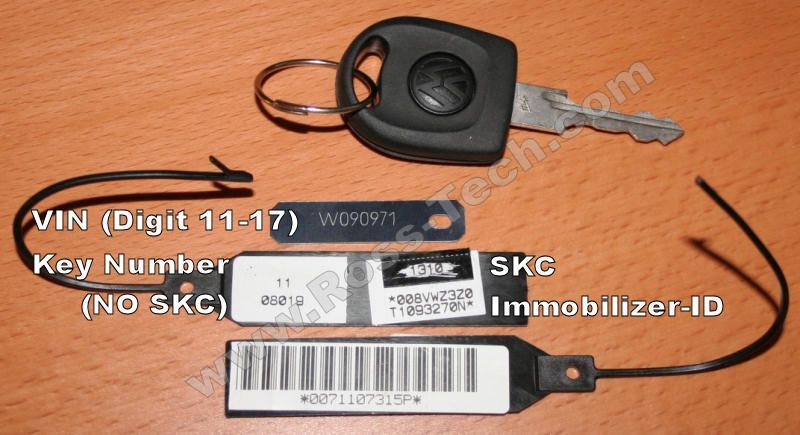
Translated on 18-09-2026, 20:45.
|
|
| Back to top |
Profile PM |
|
herwigw
Guest
Free account, no CAN development support
|
| 25-10-2006, 12:15 Subject: Remote Key Programming: Radio OK, WFS Blocked on Startup |
Quote |
|
Hello Sebastian,
Inquiries made at VW workshops also revealed that the pairing process is now only available 'online.'
BTW: What can a workshop do without an internet connection? - Is it just window dressing?
Will you still be able to see the code, or will everything be kept secret?
I would have at least liked to know how to fix it myself for future use, especially since I'm already taking it to the workshop this time.
(If it weren't so expensive, I would buy a loginsniffer - VW is annoying!)
Best regards.
herwig
Translated on 18-09-2026, 20:46.
|
|
| Back to top |
|
|
Uwe@Ross-Tech
Guest
Free account, no CAN development support
|
| 25-10-2006, 17:07 Subject: Remote Key Programming: Radio OK, WFS Blocked on Startup |
Quote |
|
By the way: What does a workshop do without an internet connection? - Does it just fail?
It's simply a requirement that they have an online connection. I suspect it's stated in their contract with VW, similar to how it's a requirement that they have a VAS device and other specialized tools.
Will you be able to see the code, or will everything be kept secret?
The code is not visible. It originates from the VW server and is directly transmitted to the vehicle by the VAS system, without the user seeing the code.
-Uwe-
Translated on 18-09-2026, 20:48.
|
|
| Back to top |
|
|
|


 Bookmarks
 Links
Links Garage
 FAQ, Legal Notice & Privacy
 RSS Feed
 Register
 Login
Login

