| Author |
Message |
ulf
Profi-Schrauber

Joined: 04/13/2002
Posts: 11058
Karma: +18 / -0 
Location: Saarland
2023 MG ZS
Premium Support
|
 02-07-2008, 6:39 Subject: USB Drivers for HEX-COM+CAN (W98) Broken:-( 02-07-2008, 6:39 Subject: USB Drivers for HEX-COM+CAN (W98) Broken:-( |
Quote |
|
Hello,
With my HEX-COM+CAN system and VCDS 8050, I wanted to start a logging session: ignition on, logging started, then start the engine - and the Lappi (Elitegroup without its own battery) turns off due to undervoltage because I forgot to connect the buffer battery  .
Approximately 2 seconds later, the engine also stalled, but it started normally again after turning the ignition off and then on.
After restarting VCDS as usual after the Scandisk process, it now constantly searches for the USB driver for the interface. If I interrupt the search, VCDS runs up to the module selection window, but a single click immediately results in a large error window – the same thing happens with the previous version 7041(?).
I haven't started trying to repair the software yet. Since I'm not very skilled with computers, and I tend to make things worse by fiddling around and causing even more damage, I'd rather ask here directly what to do  . Gruß Ulf
_________
MG4 Electric
Translated on 09-09-2026, 17:38.
|
|
| Back to top |
Profile PM Garage |
 |
dieselschrauber
Administrator


Joined: 04/12/2002
Posts: 18107
Karma: +799 / -0
Location: St.Gallen
2018 Volkswagen T6 
|
| 02-07-2008, 9:58 Subject: USB Drivers for HEX-COM+CAN (W98) Broken:-( |
Quote |
|
Hi Ulf,
Your rescuer might be the Device Manager. Try installing the Ross-Tech Direct driver.
Best regards, Rainer.
Translated on 09-09-2026, 17:40.
|
|
| Back to top |
Profile PM WWW Garage |
|
ulf
Profi-Schrauber
Joined: 04/13/2002
Posts: 11058
Karma: +18 / -0
Location: Saarland
2023 MG ZS
Premium Support
|
| 02-07-2008, 10:16 Subject: USB Drivers for HEX-COM+CAN (W98) Broken:-( |
Quote |
|
Rainer K. wrote: | | Your solution might be the device manager; try installing the Ross-Tech Direct driver. | Thank you. 
"Is the driver located in the 8050 directory on the laptop (I don't have time to check right now), or do I need to download it from Uwe's website?"
Meanwhile, I've come up with a possible Plan B:
"Uninstall version 8050 and then reinstall it" (making sure to back up the logs and my labels beforehand).
Is that also conceivable, or would a failure be foreseeable?
Or should I uninstall all approximately 5 previous versions of the professional software at the same time? Gruß Ulf
_________
MG4 Electric
Translated on 09-09-2026, 17:41.
|
|
| Back to top |
Profile PM Garage |
|
dieselschrauber
Administrator
Joined: 04/12/2002
Posts: 18107
Karma: +799 / -0
Location: St.Gallen
2018 Volkswagen T6
|
| 02-07-2008, 11:23 Subject: USB Drivers for HEX-COM+CAN (W98) Broken:-( |
Quote |
|
Hi Ulf,
Yes, the driver is located in the installation directory.
Reinstalling everything doesn't help with Windows 98, in my opinion. The pre-installation of USB drivers probably only started with later versions of Windows.
Best regards, Rainer.
Translated on 09-09-2026, 17:42.
|
|
| Back to top |
Profile PM WWW Garage |
|
ulf
Profi-Schrauber
Joined: 04/13/2002
Posts: 11058
Karma: +18 / -0
Location: Saarland
2023 MG ZS
Premium Support
|
| 02-07-2008, 12:37 Subject: USB Drivers for HEX-COM+CAN (W98) Broken:-( |
Quote |
|
Rainer K. wrote: | | The driver is located in the installation directory. | I found the following there:
RT-USB.dll
RT USB9x.inf
RT USB9x.sys
When using the automatic driver search *) for "USB<->Serial", I correctly specified the installation directory as the storage location. The "OK" button was also active, which means that something apparently useful was found in the specified storage location.
"However, the response was 'No driver could be found'."
I then tried entering the installation directory of the previous version, 7041, as a test, but the result was the same.
Quote: | | Reinstalling everything again doesn't help with Win98, IMHO, because the pre-installation of USB drivers only started with later versions of Windows. |
I didn't mean the usual reinstall process, but rather the proper removal using the uninstaller (deinstall.exe) ...?
Okay: I still have Windows 98SE on my laptop  .
*) when plugging in the USB cable (without any red or yellow problem symbols appearing in the device manager's hardware tree), or after clicking "Refresh" in the device manager. Gruß Ulf
_________
MG4 Electric
Translated on 09-09-2026, 17:44.
|
|
| Back to top |
Profile PM Garage |
|
dieselschrauber
Administrator
Joined: 04/12/2002
Posts: 18107
Karma: +799 / -0
Location: St.Gallen
2018 Volkswagen T6
|
| 02-07-2008, 13:48 Subject: USB Drivers for HEX-COM+CAN (W98) Broken:-( |
Quote |
|
Hello Ulf,
You must either remove the USB-Serial driver in Device Manager or use the Ross-Tech Direct driver with the files mentioned above.
If you want to continue using the USB-Serial device, you must specify its installation directory as the driver directory (i.e., the location where the archive was extracted).
Quote: | Quote:
Reinstalling everything doesn't help with Windows 98, in my opinion. I think the pre-installation of USB drivers only started with later versions of Windows.
I didn't mean the normal (re-)installation, but rather the proper deletion using the uninstall.exe file... |
The same might apply.
Best regards, Rainer.
Translated on 09-09-2026, 17:46.
|
|
| Back to top |
Profile PM WWW Garage |
|
ulf
Profi-Schrauber
Joined: 04/13/2002
Posts: 11058
Karma: +18 / -0
Location: Saarland
2023 MG ZS
Premium Support
|
| 02-07-2008, 16:11 Subject: USB Drivers for HEX-COM+CAN (W98) Broken:-( |
Quote |
|
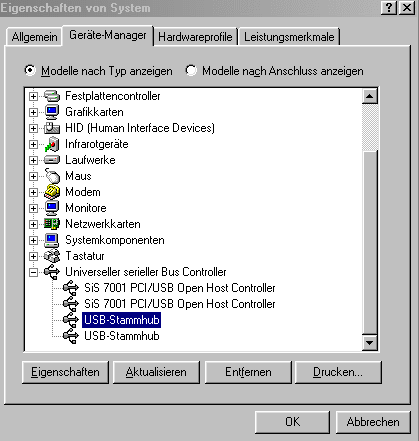
Rainer K. wrote: | | You need to either remove the USB-Serial driver in Device Manager | . Hmm, and which one exactly should I delete (see attachment)? None of them show any recognizable indication of Ross-Tech or similar in their properties.

BTW: The device manager on my home PC (also running Windows 98SE) shows the exact same drivers as the one you clicked on, and the Hex-Com CAN interface has never been plugged into it.
Quote: | | If you want to continue using the USB serial device, you must specify the driver directory as the location where the archive was extracted. | I tried that, but... see above. 
Quote: | | or use the Ross-Tech Direct driver with the files mentioned above. | Is that the RT-USB.dll file that was mentioned?
But how do I manually bind it under W98SE?
| Description: |
| USB Drivers for HEX-COM+CAN (W98) Broken:-( |
|
| File size: |
12.29 KB |
| Viewed: |
4621 times |
|
Gruß Ulf
_________
MG4 Electric
Translated on 09-09-2026, 17:48.
|
|
| Back to top |
Profile PM Garage |
|
dieselschrauber
Administrator
Joined: 04/12/2002
Posts: 18107
Karma: +799 / -0
Location: St.Gallen
2018 Volkswagen T6
|
| 02-07-2008, 16:34 Subject: USB Drivers for HEX-COM+CAN (W98) Broken:-( |
Quote |
|
Hi Ulf,
You will only see the diagnostic cable in the Device Manager if it is also connected.
Quote: | Quote:
or use the Ross-Tech Direct driver with the files mentioned above.
Is this the aforementioned RT-USB.dll file? |
Yes.
Plug in the cable, then right-click on the device icon in Device Manager, select "Properties," and choose the driver.
The items in your picture are "normal" and are part of PC hardware.
Best regards, Rainer.
Translated on 09-09-2026, 17:50.
|
|
| Back to top |
Profile PM WWW Garage |
|
ulf
Profi-Schrauber
Joined: 04/13/2002
Posts: 11058
Karma: +18 / -0
Location: Saarland
2023 MG ZS
Premium Support
|
| 02-07-2008, 17:25 Subject: USB Drivers for HEX-COM+CAN (W98) Broken:-( |
Quote |
|
EDIT
Rainer K. wrote: | | In the Device Manager, you only see the diagnostic cable if it is also plugged in. | This works for other USB components, but it doesn't work (anymore) with the Hex-CAN: the Device Manager remains unchanged, regardless of whether the ignition is on or off.
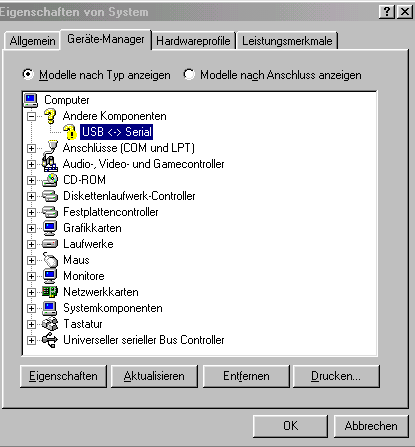
I've temporarily installed the 8050 software on my home PC as well: at least this way, the Hex-CAN is displayed as a yellow question mark -> attachment.
Quote: | | Plug in the cable, then right-click on the device icon in Device Manager, select Properties, and choose the driver. | If that doesn't work: After correctly specifying the installation directory (on the home PC), you still get the message "no driver for the device could be found."
In the Lappi device manager, I can no longer find the (plugged-in) Hex-CAN device  .
And now? Did I damage the interface by abruptly shutting down the laptop (and if so, why did it survive multiple times before)?
But as I said: something is still alive in there, because when you plug it in, the driver search starts immediately .
| Description: |
| So sieht es direkt nach der erstmaligen 8050-Installation auf meinem Heim-PC aus. Im Lappi kriege nicht mal das gelbe "?" zu sehen. |
|
| File size: |
11.99 KB |
| Viewed: |
4201 times |
|
Gruß Ulf
_________
MG4 Electric
Translated on 09-09-2026, 17:52.
|
|
| Back to top |
Profile PM Garage |
|
dieselschrauber
Administrator
Joined: 04/12/2002
Posts: 18107
Karma: +799 / -0
Location: St.Gallen
2018 Volkswagen T6
|
| 02-07-2008, 18:38 Subject: USB Drivers for HEX-COM+CAN (W98) Broken:-( |
Quote |
|
*g*
The yellow question mark indicates the HEX-USB+CAN. Please also open the list of USB devices at the bottom.
It's best to remove the serial port setting at the top and then install the correct driver by right-clicking, going to "Properties," and selecting "Install another driver." Before doing this, select the device you want to modify by left-clicking on it.
I meant connecting the diagnostic cable to the PC, not to the car.
Best regards, Rainer.
Translated on 09-09-2026, 17:54.
|
|
| Back to top |
Profile PM WWW Garage |
|
ulf
Profi-Schrauber
Joined: 04/13/2002
Posts: 11058
Karma: +18 / -0
Location: Saarland
2023 MG ZS
Premium Support
|
| 02-07-2008, 19:40 Subject: USB Drivers for HEX-COM+CAN (W98) Broken:-( |
Quote |
|
Rainer K. wrote: | | Bitte auch mal unten bei den USB Geräten aufklappen . . . Mit 'anstecken' meinte ich das Diagnosekabel am PC anstecken, nicht am Auto. | Und genau dabei tut sich nix, wenn ich das Hex-CAN ans Lappi stöpsele: ich sehe nur die 4 normalen Treiber wie oben im 1. Adepicted.
Quote: | | To install the correct driver, right-click on the device, go to Properties, and then select "Install another driver." Before doing this, select the device you want to modify by left-clicking on it. | If I cannot do this for the reasons mentioned above: The Hex-CAN device does not appear anywhere in the laptop's Device Manager.
Sorry that the dialogue got so long; I hope I managed to convey the message. Gruß Ulf
_________
MG4 Electric
Translated on 09-09-2026, 17:55.
|
|
| Back to top |
Profile PM Garage |
|
dieselschrauber
Administrator
Joined: 04/12/2002
Posts: 18107
Karma: +799 / -0
Location: St.Gallen
2018 Volkswagen T6
|
| 02-07-2008, 20:00 Subject: USB Drivers for HEX-COM+CAN (W98) Broken:-( |
Quote |
|
Hi Ulf,
Call me; I'll send you my number via private message.
[Edit] It appears that the diagnostic cable is faulty. [/Edit]
Best regards, Rainer.
Translated on 09-09-2026, 17:55.
|
|
| Back to top |
Profile PM WWW Garage |
|
|


 Bookmarks
 Links
Links Garage
 FAQ, Legal Notice & Privacy
 RSS Feed
 Register
 Login
Login
