| Author |
Message |
VR6machine
Joined: 05/27/2019
Posts: 15
Karma: +2 / -0 
Premium Support
|
 23-04-2020, 19:15 Subject: Reset WIV: Incorrect Infotainment Values 23-04-2020, 19:15 Subject: Reset WIV: Incorrect Infotainment Values |
Quote |
|
Hello everyone,
Recently, I performed an oil change and inspection on my friend's Golf 7. Afterwards, I tried to reset the service interval using VCDS, but the assistant function didn't work again. So, I directly reset the service interval via the control unit 17.
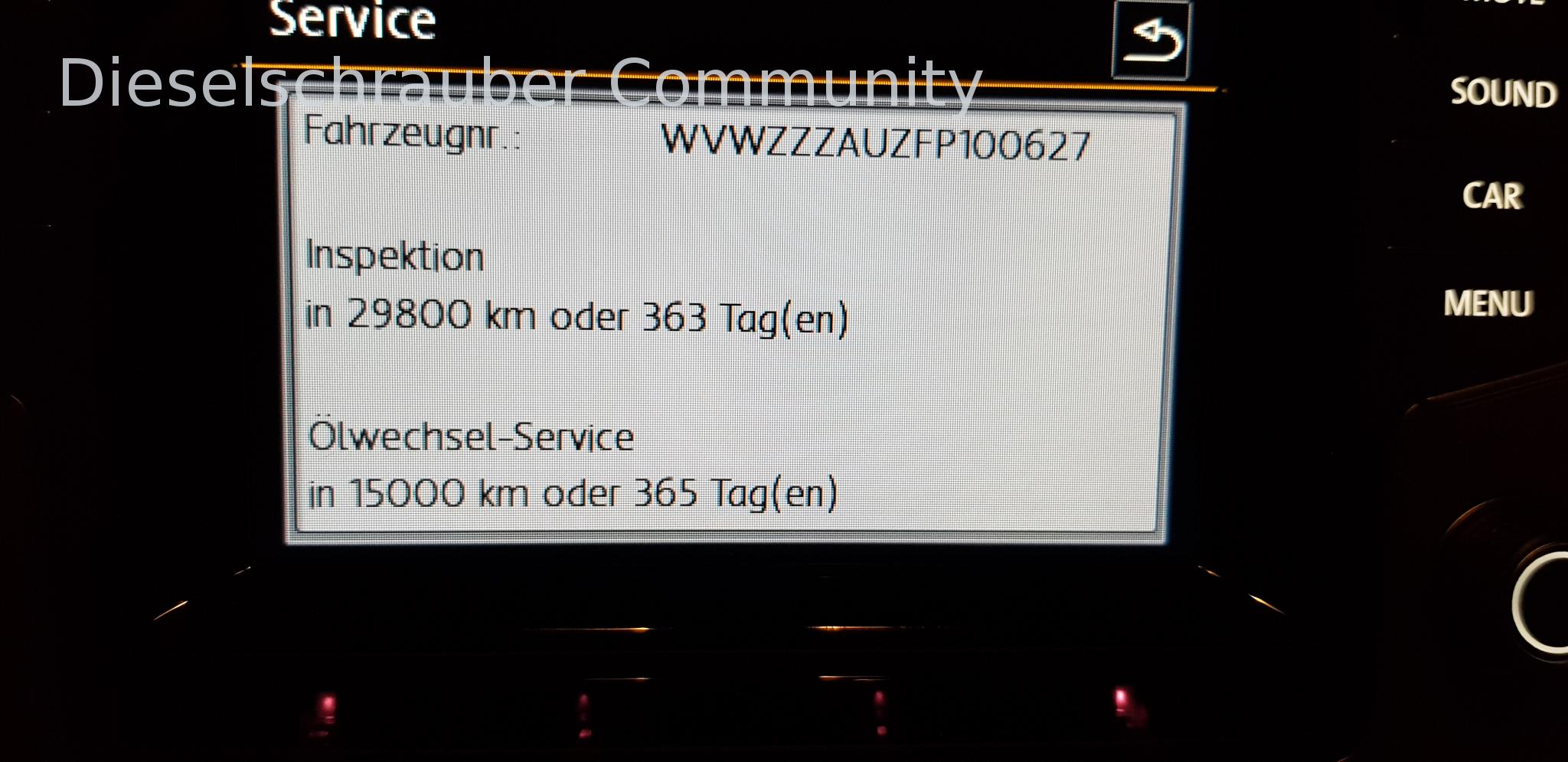
So far, everything seems to be in order, and the values in the control unit appear to be correct, as far as I can tell. Now, here's my problem. The display on the infotainment system shows 15,000 km and 365 days for the next oil change, instead of the correct 30,000 km and 730 days. I initially thought that perhaps the minimum values were being displayed. But she mentioned that it had previously shown 30,000 km and 730 days. The displayed values also decrease correctly based on the kilometers driven and the days elapsed. Am I overlooking any parameter that still needs to be adjusted, or do I need to change any parameters in the infotainment control unit? Perhaps someone here can help me with my problem  .
Thank you in advance. I've attached the log file and the image.
| Description: |
| Reset WIV: Incorrect Infotainment Values |
|
| File size: |
2.36 MB |
| Viewed: |
2306 times |
|
| Description: |
| Reset WIV: Incorrect Infotainment Values |
|

Download |
| File name: |
Log-WVWZZZAUZFP100627.txt |
| File size: |
17.07 KB |
| Downloaded: |
462 times |
Translated on 04-09-2026, 22:56.
|
|
| Back to top |
Profile PM |
 |
guste100
Profi-Schrauber


Joined: 07/27/2004
Posts: 2405
Karma: +441 / -0
Location: Mitte Schleswig Holsteins
2007 Volkswagen Passat
Premium Support
dieselschrauber and VR6machine likes this. |
| 24-04-2020, 8:20 Subject: Reset WIV: Incorrect Infotainment Values |
Quote |
|
You were still messing around with channels for fixed services after setting up the correct channels. Some control units require a strict order of channels. I can't say whether yours is one of those sensitive ones.
Please provide the German text you would like me to translate into English.
1. Reset (IDE00342)
2. Change the oil quality to good (IDE00492).
Regards,
Guste.
Translated on 04-09-2026, 22:58.
|
|
| Back to top |
Profile PM Garage |
|
vag-driver
Profi-Schrauber
Joined: 01/03/2015
Posts: 938
Karma: +400 / -0
Premium Support
dieselschrauber and VR6machine likes this. |
| 24-04-2020, 10:07 Subject: Reset WIV: Incorrect Infotainment Values |
Quote |
|
You definitely need to adjust and save the oil quality settings again!
Viele Grüße
Andreas
*** Ein Ingenieur muss vordenken. Wenn er anfängt nachzudenken ist es schon zu spät. ***
Translated on 04-09-2026, 22:59.
|
|
| Back to top |
Profile PM |
|
VR6machine
Joined: 05/27/2019
Posts: 15
Karma: +2 / -0
Premium Support
|
| 24-04-2020, 12:51 Subject: Reset WIV: Incorrect Infotainment Values |
Quote |
|
Hello everyone,
First of all, thank you for the answers.
Hmm, I have to set the FIX values to 0 to reset the inspection. But that there's a prescribed sequence for some control units is new to me. I've learned something again .
The inspection reminder is fine, but the oil change is showing a fixed interval instead of a longlife interval, even though the longlife values are stored in the control unit. But okay, I'll try it again in the correct order. I don't need to access the fixed values anymore, they are fine and are also displayed correctly in the infotainment system.
I'll try again in the correct order and then let you know.
Translated on 04-09-2026, 23:00.
|
|
| Back to top |
Profile PM |
|
VR6machine
Joined: 05/27/2019
Posts: 15
Karma: +2 / -0
Premium Support
|
| 29-04-2020, 12:59 Subject: Reset WIV: Incorrect Infotainment Values |
Quote |
|
Hello everyone,
"I had the vehicle back again last night and reset the service interval again, also adjusted the oil quality setting to 'good' as suggested by guste100. Of course, I saved everything and didn't make any other changes to the control unit afterwards, but unfortunately, the problem still persists."
Does anyone have any other suggestions as to what might be the cause?
Translated on 04-09-2026, 23:01.
|
|
| Back to top |
Profile PM |
|
dieselschrauber
Administrator


Joined: 04/12/2002
Posts: 18128
Karma: +803 / -0
Location: St.Gallen
2018 Volkswagen T6 
|
| 29-04-2020, 17:56 Subject: Reset WIV: Incorrect Infotainment Values |
Quote |
|
Hi,
Please post your adaptation log from the VCDS installation directory.
I don't remember the exact name, but it's easy to find there. It has a .txt or .log extension. It's a text file that contains information about what changes were made.
Best regards, Rainer.
Translated on 04-09-2026, 23:02.
|
|
| Back to top |
Profile PM WWW Garage |
|
VR6machine
Joined: 05/27/2019
Posts: 15
Karma: +2 / -0
Premium Support
|
| 29-04-2020, 19:40 Subject: Reset WIV: Incorrect Infotainment Values |
Quote |
|
Hello,
Okay, in the installation directory, I have the following files with a .txt extension: Autoscan, CSVReadme_OSS, Ich-loc, MyAutoScan, stop-LCH, and VCScope_Readme_OSS.
Which one is correct? There are no .log files. Or do I need to search in a subdirectory?
Translated on 04-09-2026, 23:02.
|
|
| Back to top |
Profile PM |
|
dieselschrauber
Administrator
Joined: 04/12/2002
Posts: 18128
Karma: +803 / -0
Location: St.Gallen
2018 Volkswagen T6
|
| 29-04-2020, 19:59 Subject: Reset WIV: Incorrect Infotainment Values |
Quote |
|
Yes, take a look in a subfolder. 
Translated on 04-09-2026, 23:03.
|
|
| Back to top |
Profile PM WWW Garage |
|
VR6machine
Joined: 05/27/2019
Posts: 15
Karma: +2 / -0
Premium Support
|
| 29-04-2020, 20:07 Subject: Reset WIV: Incorrect Infotainment Values |
Quote |
|
Hmmm, maybe it's in the "Debug" folder. I found a file called "Adplog.csv" here. Could that be it?
| Description: |
| Reset WIV: Incorrect Infotainment Values |
|
Download |
| File name: |
AdpLog.CSV |
| File size: |
3.35 KB |
| Downloaded: |
268 times |
Translated on 04-09-2026, 23:03.
|
|
| Back to top |
Profile PM |
|
dieselschrauber
Administrator
Joined: 04/12/2002
Posts: 18128
Karma: +803 / -0
Location: St.Gallen
2018 Volkswagen T6
VR6machine likes this. |
| 29-04-2020, 22:47 Subject: Reset WIV: Incorrect Infotainment Values |
Quote |
|
Yes, perfect, that's exactly what I meant!
It actually looks good. Could you take a Screenshot showing which adjustment channels you have available?
Possibly, something was already misconfigured beforehand.
Best regards, Rainer.
Translated on 04-09-2026, 23:04.
|
|
| Back to top |
Profile PM WWW Garage |
|
VR6machine
Joined: 05/27/2019
Posts: 15
Karma: +2 / -0
Premium Support
|
| 29-04-2020, 23:12 Subject: Reset WIV: Incorrect Infotainment Values |
Quote |
|
Okay, I'll take a Screenshot of the channels. However, it might take a few days, depending on how long it takes them to bring the vehicle in.
Thank you in advance .
Translated on 04-09-2026, 23:04.
|
|
| Back to top |
Profile PM |
|
VR6machine
Joined: 05/27/2019
Posts: 15
Karma: +2 / -0
Premium Support
|
|
| Back to top |
Profile PM |
|
vag-driver
Profi-Schrauber
Joined: 01/03/2015
Posts: 938
Karma: +400 / -0
Premium Support
dieselschrauber likes this. |
| 01-05-2020, 13:59 Subject: Reset WIV: Incorrect Infotainment Values |
Quote |
|
Have you already reset the IDE000342 WIV setting?
Otherwise, check or reset IDE000510 - IDE000515.
It has to work like this.
Viele Grüße
Andreas
*** Ein Ingenieur muss vordenken. Wenn er anfängt nachzudenken ist es schon zu spät. ***
Translated on 04-09-2026, 23:05.
|
|
| Back to top |
Profile PM |
|
VR6machine
Joined: 05/27/2019
Posts: 15
Karma: +2 / -0
Premium Support
|
| 01-05-2020, 14:33 Subject: Reset WIV: Incorrect Infotainment Values |
Quote |
|
Okay, the values are fine (see log).
Translated on 04-09-2026, 23:05.
|
|
| Back to top |
Profile PM |
|
chli1976
Profi-Schrauber
Joined: 11/29/2003
Posts: 873
Karma: +186 / -0
Premium Support
dieselschrauber and VR6machine likes this. |
| 02-05-2020, 8:26 Subject: Reset WIV: Incorrect Infotainment Values |
Quote |
|
"Search on MT for the user hadez16; they wrote a program that sets up all the necessary channels. Try using that."
It's called VCDServiceReset.
VCDS
Translated on 04-09-2026, 23:05.
|
|
| Back to top |
Profile PM |
|
VR6machine
Joined: 05/27/2019
Posts: 15
Karma: +2 / -0
Premium Support
|
| 02-05-2020, 13:14 Subject: Reset WIV: Incorrect Infotainment Values |
Quote |
|
OK, thanks, I'll give it a try.
Translated on 04-09-2026, 23:06.
|
|
| Back to top |
Profile PM |
|


 Bookmarks
 Links
Links Garage
 FAQ, Legal Notice & Privacy
 RSS Feed
 Register
 Login
Login

